
Open WebUI
Objective
In order to facilitate AI use and allow users to experiment with different models and tools, we host an instance of Open WebUI at https://aichat.phys.ethz.ch. You can either use external models or request an API token for our onprem models. In both cases, you'll have to tell Open WebUI about the models you'd like to use.
How to configure our onprem model in Open WebUI
Here we describe how to add our onprem Qwen3.8-27B-FP8:
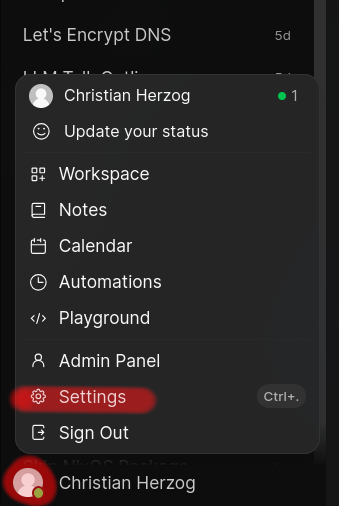
- Click on your avatar and open
Settings
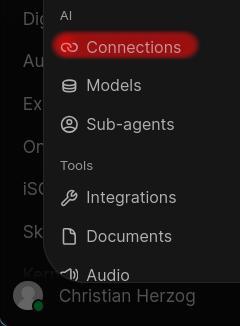
- Click on
Connections
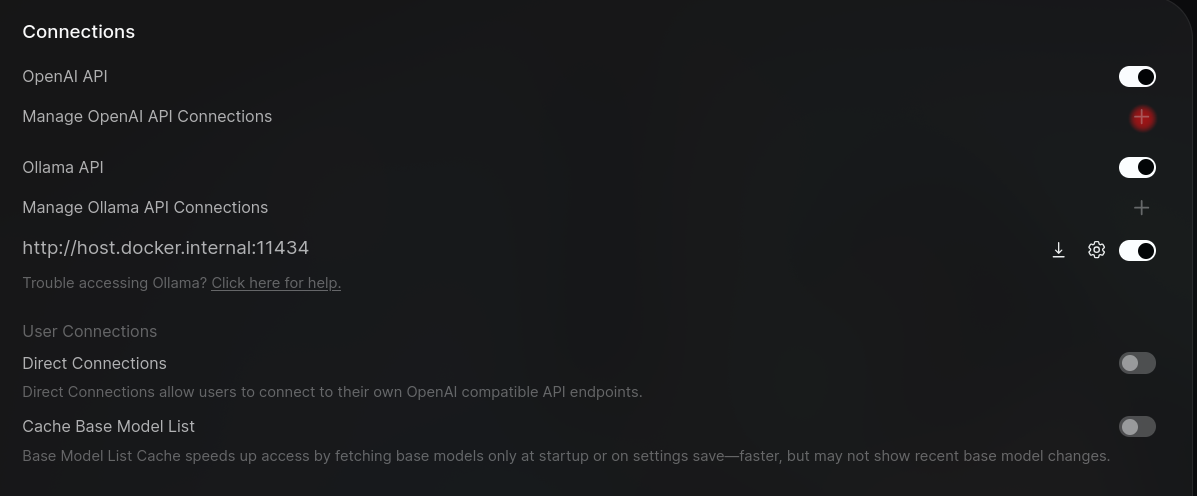
- Click on the plus sign near
Manage OpenAI API Connections
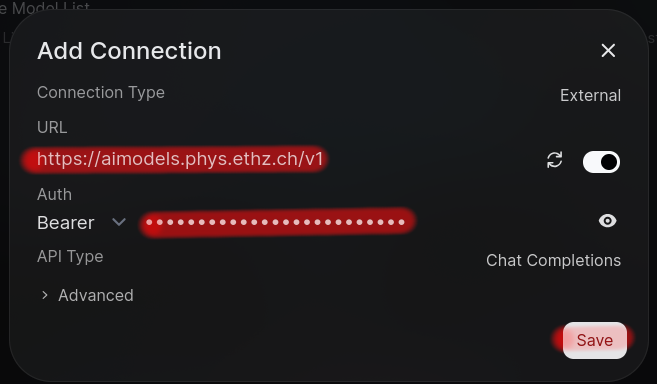
- In
URL, addhttps://aimodels.phys.ethz.ch/v1and inBeareradd thesk-xyztoken you received from us
- Save
- Your browser will then ask you if you'd like to allow local network connections. You'll have to agree to that.
- There's one more setting you'll have to change in order for auto compaction to work correctly:
Settings->Models->Qwen3.8-27B-FP8 Private-> ✏️ ->Advanced Params->Context Compaction Threshold-> enter150000->Save & Update
At the very bottom of your chat window you can now choose Qwen3.8-27B-FP8 as your preferred model. Don't use Qwen3-Embedding-4B as this is for dedicated embeddings.
Notes
As the LLM requests are coming directly from your browser and out GPU hardware is in an internal network, aichat.phys will only work within the ETH network or via VPN.